
Posted Mar 14, 2026
pingtrace: Fast Network Troubleshooting & Evidence Capture
A terminal-first CLI designed for rapid network operations, combining ping and traceroute with clear, intuitive outputs enriched by DNS and GeoIP data.
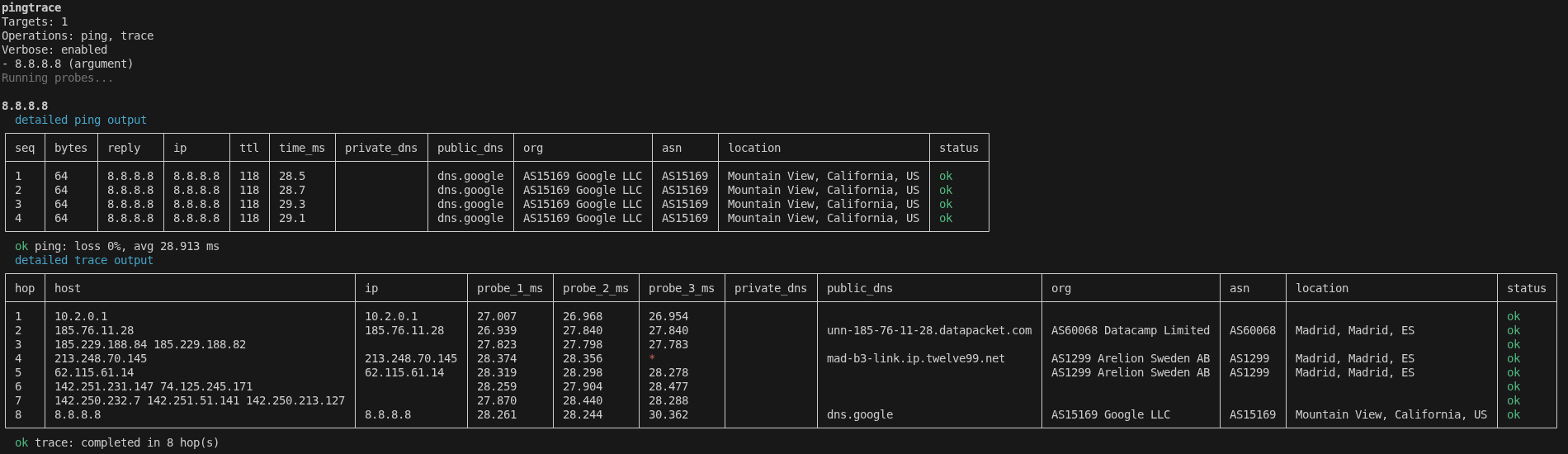
During an incident, the last thing you want is to manually run ping, wait, run traceroute, wait again, copy the output, lookup the ASN, and paste it all into a ticket. I built pingtrace to solve this operational friction.
It runs ping and traceroute in a single command against:
- Single target: Quick validation check for a single host.
- Multi-target: Separate multiple targets with commas for simultaneous checks.
- Bulk loading: Import target lists directly from CSV files.
- CIDR blocks: Automatically resolve and scan entire IPv4 CIDR blocks.
The focus is simple: fast inputs, clean visual outputs, and optional CSV export for documentation.
Install
npm install -g pingtrace
pingtrace --help
Quick start
Run both ping and trace against a single host:
pingtrace 8.8.8.8Run with detailed verbose tables (resolving ASNs and ISP info):
pingtrace 8.8.8.8 -vRun against multiple targets simultaneously:
pingtrace 8.8.8.8,1.1.1.1,example.comScan a CIDR block:
pingtrace 10.0.0.0/30Load targets from a CSV file:
pingtrace --file ./targets.csvExport results to CSV in the current working directory:
pingtrace 8.8.8.8 --exportExport to a specific directory:
pingtrace 8.8.8.8 --export ./reportsWhen export is enabled, the CLI writes separate files per operation:
ping_UTCdate(YYYY-MM-DD-HH-MM-SS).csvtrace_UTCdate(YYYY-MM-DD-HH-MM-SS).csv
Run only ping:
pingtrace 8.8.8.8 --no-traceRun only trace:
pingtrace 8.8.8.8 --no-pingConfiguration
Open the interactive configuration editor:
pingtrace configList all current configuration values:
pingtrace config listSet a configuration value directly:
pingtrace config set ping.packetCount 3Set target DNS server lists:
pingtrace config set dns.publicServers 8.8.8.8
pingtrace config set dns.publicServers 8.8.8.8,1.1.1.1
pingtrace config set dns.privateServers 10.0.0.0/30
If providers.ipinfoToken is configured, verbose mode automatically enriches public IP hops with GeoIP and ISP metadata.
Supported configuration keys:
dns.privateServersdns.publicServersproviders.ipinfoTokenproviders.peeringDBEnabledping.packetSizeping.packetCountping.timeoutSecondstrace.maxHopstrace.timeoutSecondstrace.numericOnly
Command cheatsheet
pingtrace help
pingtrace --version
pingtrace <target-or-targets-or-cidr>
pingtrace --file <path>
pingtrace <target> -v
pingtrace config
pingtrace config set <key> <value>
pingtrace config get <key>
pingtrace config list
pingtrace config reset
Operational notes
- Tool Dependencies:
pingtracedepends on systempingandtraceroutebinary tools being available in your systemPATH. - OS Compatibility: On Windows,
tracertis used under the hood. On Unix-like systems,tracerouteis used (withtracepathas a fallback where available). - Export Logic: Running
--exportwithout a path generates CSV files in the current working directory. If a file path is provided, the tool uses that file’s parent directory.
Feedback
If this tool saves you time during a late-night troubleshooting session, it was worth building.
Star the project on GitHub, and if you find it useful, invite me for a coffee or buy a treat for my buddy Schnauzer Tyson!